
The latest Win2PDF update (version 10.0.174) includes several enhancements along with one significant new feature – the ability to attach a file to a PDF. This involves embedding the source document (like a Word document, Excel sheet, or another PDF) or adding a supplemental file within the PDF as an attachment.
When someone opens the PDF in a compatible viewer (like Adobe Acrobat), they can access and open the attached file.
This is useful for providing supplementary materials along with the main PDF document, or to include the source document as a reference for future editing or archiving purposes.
There are several practical reasons why you might want to insert or attach source documents into a PDF:
Maintaining Original File Formats
Sometimes, converting a file to PDF can lose certain functionalities or formatting. Attaching the original source file ensures that recipients have access to the file in its native format.
Legal or Auditing Purposes
In legal or auditing contexts, it’s often necessary to provide the original source documents as evidence. Attaching these files to a PDF ensures that they are kept together and are easily accessible.
Collaboration
When collaborating on a project, you might want to provide the source files for editing or review. Attaching them to a PDF makes it easy to share or archive all the necessary materials in one package.
Providing Supplementary Information
You might have a main PDF report, but want to include the raw data in an Excel spreadsheet, or detailed background information in a Word document. Attaching these files allows recipients to access the extra materials if they need them. For example, a financial report PDF could have the supporting financial data as an attached Excel file.
The Attachment feature can be accessed in several ways.
- Through the Win2PDF Desktop App’s Attachment menu
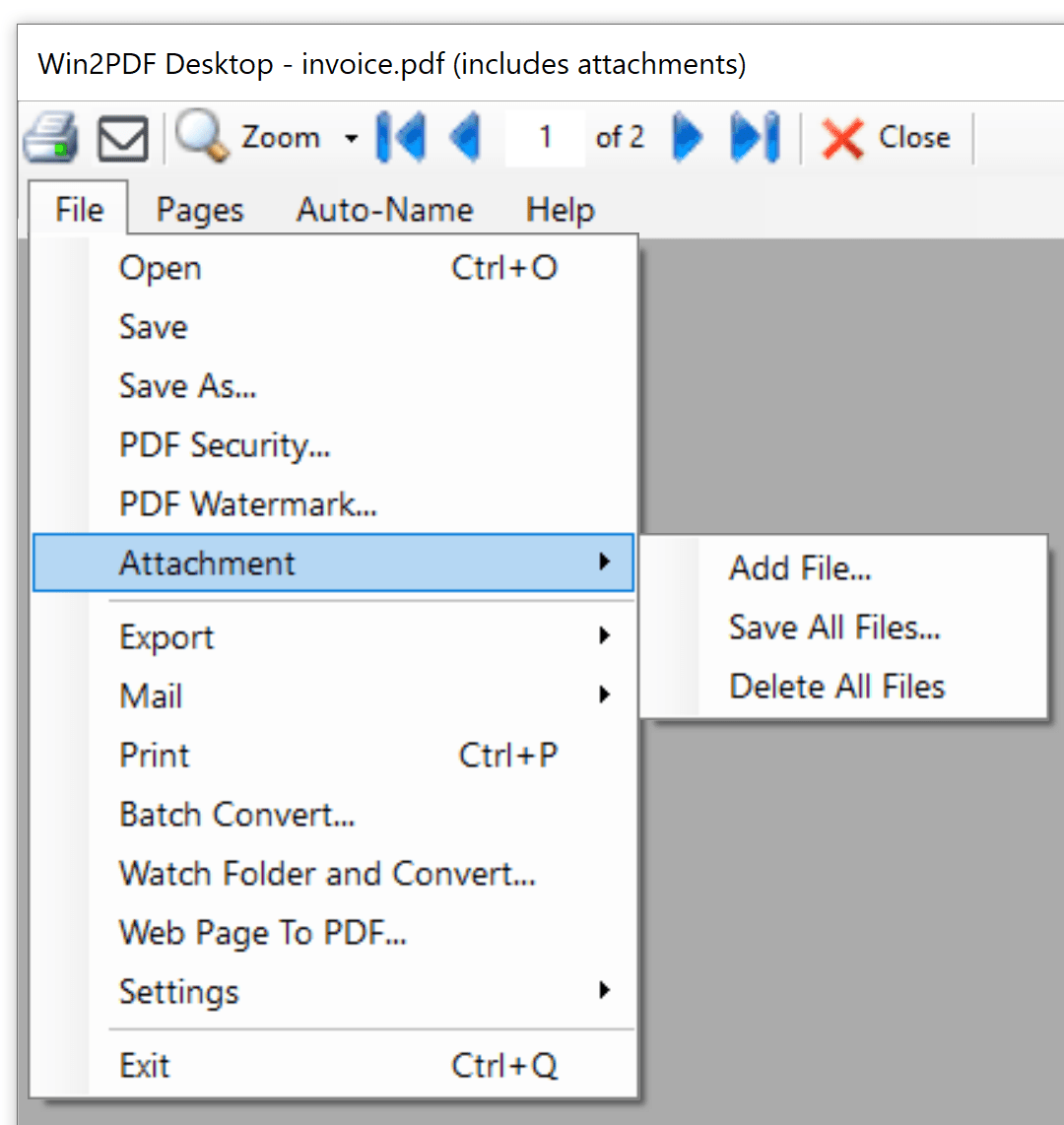
This method allows you to open a PDF file in the Win2PDF Desktop App and Add a file attachment, Save all attachments currently in the PDF file, and Delete all attachments in the PDF file. The Win2PDF Desktop window shows the PDF file name along with (includes attachments).
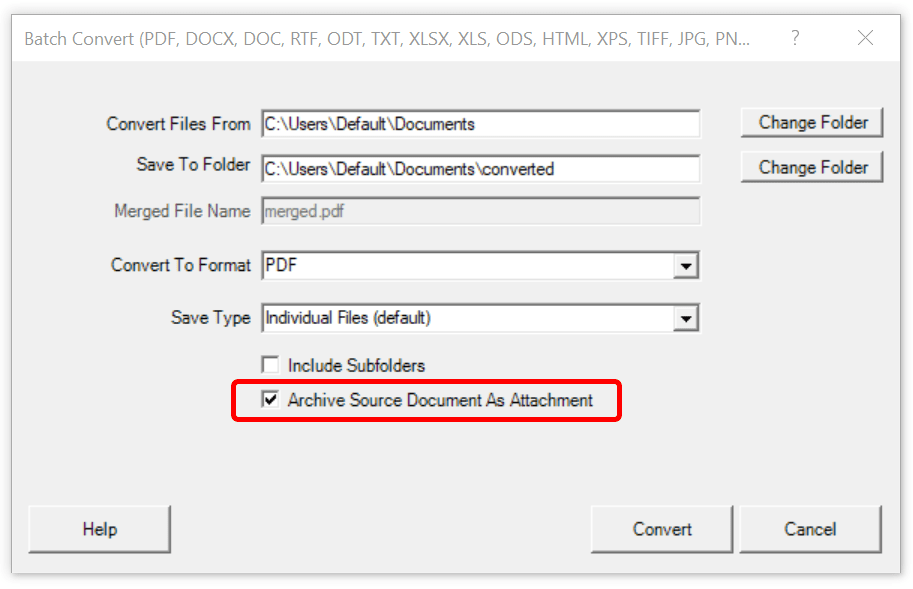
- As part of the batch convert feature when the “Archive Source Document As Attachment” box is checked.
- Through the Win2PDF command line.
PDF Add File Attachment Command Line Format
PDF Save All File Attachments Command Line Format
PDF Delete All File Attachments Command Line Format
PDF Attachment Count Command Line Format
Of course, there are security risks when attaching or saving additional files from a PDF. For security reasons, files that could potentially contain malicious code, like .zip, .exe, and .bat, cannot be attached or saved using Win2PDF.
Once file(s) have been attached to a PDF, you can verify the new file in Adobe Reader. To view attachments in Adobe Reader, go to ” ≡ ➜ View ➜ Show/Hide ➜ Side panels ➜ Attachments”
Other changes to this update are:
- Added support for converting email formats EML, MSG, and MHT files to PDF, images, and text. (Win2PDF Pro only)
- Added command lines to convert from email formats to PDF: “EML2PDF“, “MSG2PDF“, and “MHT2PDF” command lines. Also added command line options to print spreadsheet formats to a paper printer: “PRINTEML“, “PRINTMSG“, and “PRINTMHT“. (Win2PF Pro only)
- Added “pdfscansearchable” output format to the command line “convertto”, “batchconvert”, and “watchconvert” commands to improve text recognition for lower quality scanned documents
- Added “makescansearchable” command line option to improve the text recognition for lower quality scanned documents.
- Added Windows Explorer “Open With” file associations for the following file types: .EML, .MSG, .MHT (Win2PDF Pro only)
- Performance and stability improvements.
The downloads for the Win2PDF 10.0.174 Update are free for current Win2PDF 7 or higher users, and standard edition users can upgrade to Pro to get these new features.
 PDF Blog - Topics from the makers of Win2PDF