Think Before You Upload: Why Offline PDF Tools Are the Safer Choice

CloudSEK, a cybersecurity company that specializes in using artificial intelligence to predict and mitigate digital threats, recently wrote of a new threat posed by some online PDF converters. CloudSEK’s investigation reveals a growing threat from fake online PDF converters that mimic legitimate services.

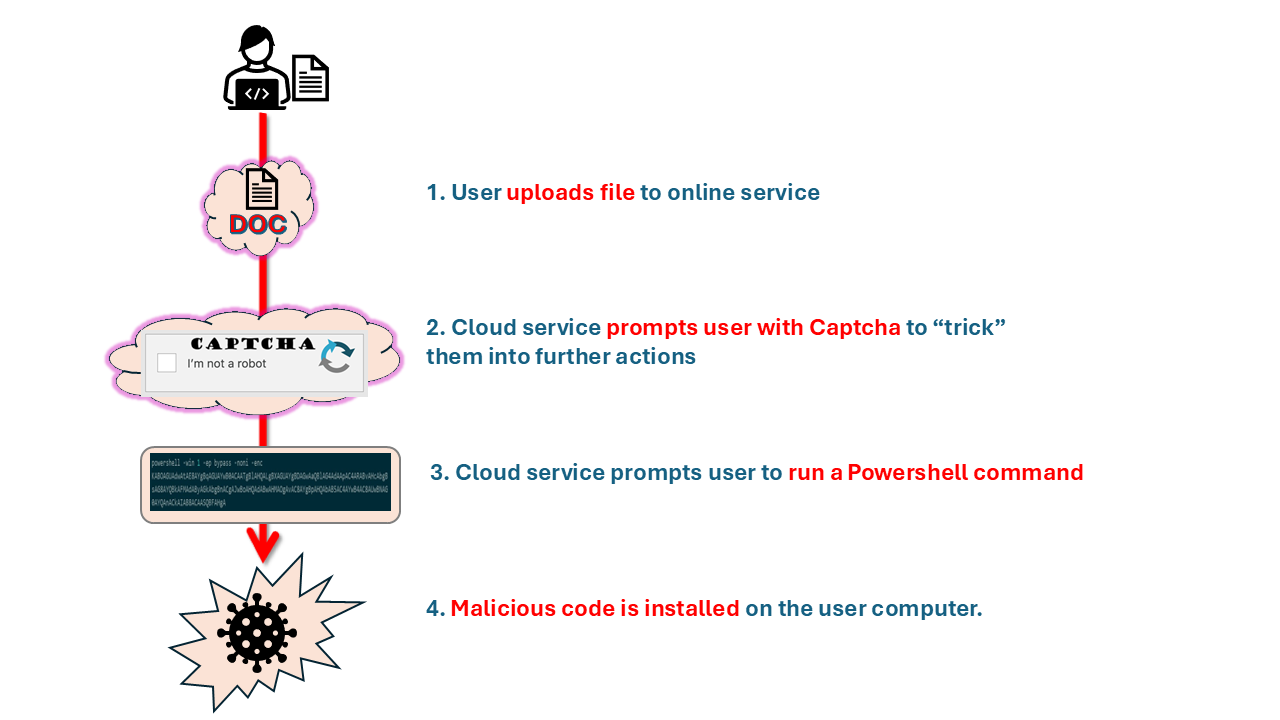
These fraudulent websites trick users into uploading files for conversion, only to execute malicious PowerShell commands that install malware. The malware steals sensitive data such as browser credentials and cryptocurrency wallet information. This highlights the risks of relying on unverified online tools for file conversion.

Here’s how it works: When users start the PDF conversion process on a malicious website, they encounter clever tricks designed to manipulate their actions. This could be fake loading animations or a CAPTCHA request. These imitate legitimate security steps, which make the sites seem trustworthy.

However, following the deceptive CAPTCHA interaction, the website prompts users to execute a PowerShell command that infects the user’s computer with malware.
Offline PDF tools, such as Win2PDF, offer a significant security advantage over online converters by processing documents locally. This ensures sensitive files remain on your computer, mitigating the risks of data theft and malware.

Win2PDF operates exclusively on your local system, guaranteeing that your files and data never leave your computer or network.

To ensure the security of your personal and professional data amidst ongoing cyber threats targeting online platforms, selecting offline PDF tools such as Win2PDF is a safer approach. Offline solutions enable efficient file conversion while preserving data protection.

Ultimately, choosing software to process your company’s sensitive documents requires trust. You can trust Win2PDF because:

Trust your documents to a secure solution. Download Win2PDF and see why we’ve been trusted for over 25 years. (Also, make sure that you only download only official setup programs from the Win2PDF website.)

FTC Action Highlights Problems With PDF Software Subscriptions

Over the past decade, there has been an increasing trend to move software licensing to a subscription-based model, with monthly fees replacing the previously common one-time cost for a perpetual license. While these software subscriptions can be beneficial to a software company’s bottom line, they can be detrimental for users. The high cost and the difficulty in terminating these subscriptions can be major pain points for consumers.

The recent actions taken by the Federal Trade Commission against Adobe and its executives highlight this issue. Adobe’s practices of obscuring early termination fees and making cancellation processes difficult have resulted in consumer confusion and frustration. Users complain they were tricked into year-long contracts hidden by fine print, and the company made it intentionally difficult to try to get out of the subscriptions.

Compounding this problem, moving PDF and other software services to the cloud (and your data into the hands of another company) can also represent significant concerns in terms of privacy or confidentiality of customer data. Adobe faced similar backlash when it recently updated its terms of service.

The new terms include provisions that grant Adobe extensive rights to access, use, and potentially monetize data uploaded to or processed by their software. This includes artwork, designs, and other creative works, which can be scanned and utilized for various purposes, including machine learning and other services under Adobe’s vast umbrella.

Consider the implications for customer’s working under non-disclosure agreements (NDAs), or customers working with legal documents or medical records that are protected under HIPAA. Allowing your PDF provider access to your data can be perilous for many reasons.

These issues serve as a reminder that software companies should prioritize transparency and user-friendly cancellation processes to ensure fair treatment of their customers.

Win2PDF has not changed its licensing, prices or terms of service in over two decades and we have no plans to do so. Our software is sold as a perpetual one-time license, comes with a simple 60-day return policy (for any reason) that we honor promptly, and your data is your data. It is never transferred, used or monetized by us. Just like Vegas, what happens on your computer, stays on your computer.

The PDF Pro Tip That Could Have Saved Paul Manafort’s Lawyers From Regret

We just released a free update to Win2PDF (version 10.0.40) that has a new feature that could have been useful for Paul Manafort’s lawyers, as this Wired article explains.

“The latest reminder came this week, when [Paul Manafort’s] defense lawyers failed to sufficiently redact portions of a court filing submitted on Tuesday, responding to Robert Mueller’s claims that Manafort violated his plea agreement with the special counsel by lying to prosecutors.”

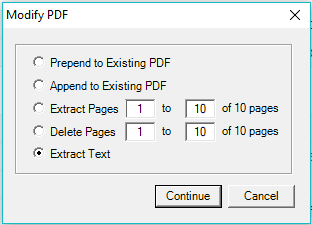
What is the new feature?  Well, it’s a enhancement to our Win2PDF Desktop app that allows you to extract all of the text from a PDF file and then save the results to a simple TEXT file.  All you need to do is drop the PDF file on the Win2PDF Desktop icon and then select ‘Extract Text‘ from the pop-up menu shown below.

extract_text

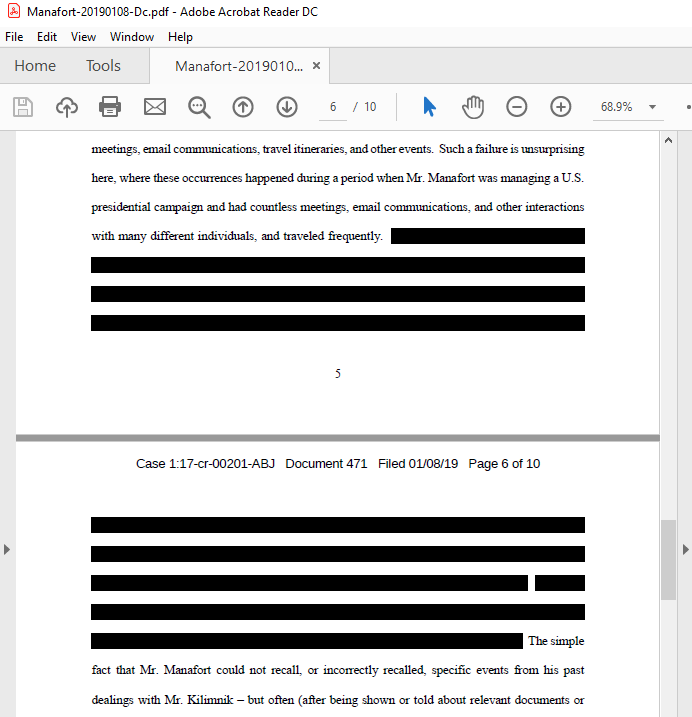
This would have turned the following redacted Manafort court document (shown as a PDF file):

manafort1

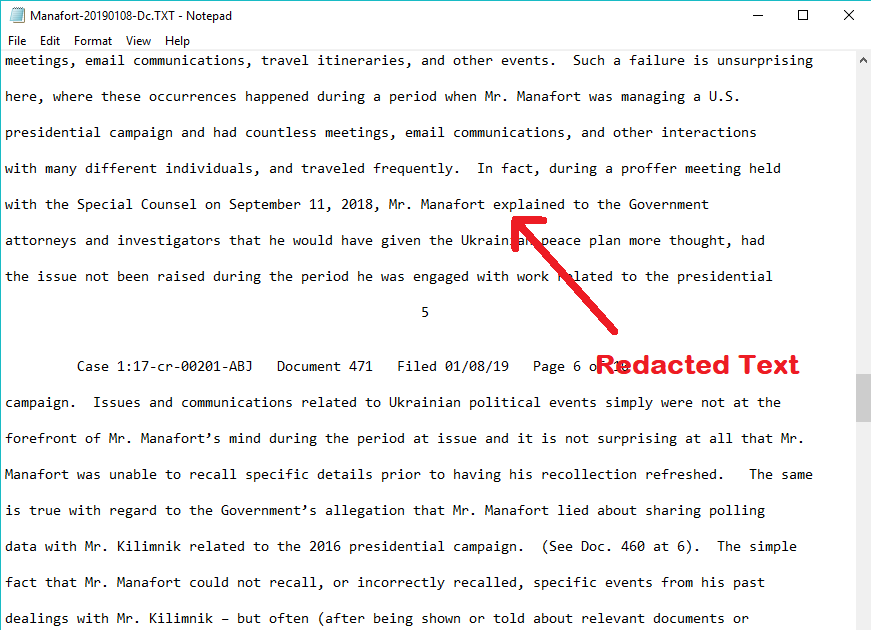
into this TEXT file:

manafort2

You can see that the redacted text in the PDF file converted completely to readable text in the text file.

This feature, obviously, wasn’t created for the purpose of exposing redacted text, but it does exemplify a case where it would have been useful.  We’ve had many other customers who were looking for an easy way to convert PDF documents into TEXT files for other business purposes.

You can download the latest update (free for licensed Win2PDF 7 or Win2PDF 10 users) from our support download page.

Celebrating 10 years as a BBB accredited business

Hooray!  Even though we’ve been in business over 18 years, we just received our official 10-year certification as an accredited business from the Better Business Bureau (BBB).  Our company — Dane Prairie Systems (the creator of the Win2PDF software) — has an A+ rating.  To be an accredited BBB business we have to abide by this code of business practices.

IMG_6610_2

There’s a lot of concern these days about who you are doing business with online, if they are trustworthy, and how they are treating you as a customer (with good reason).  One thing that contributes to our A+ rating is the fact that we do not bundle adware, spyware, or malware — you just get our Win2PDF software when you purchase from us.  Nor do we share or sell your email address or customer information with any other companies (unless you explictly opt-in, of course, for things like online reviews).  You can review our policy policy or view our rating with the Better Business Bureau.  And if you have any questions about how we do business, please let us know.

Thanks to our customers, we’ll continue to be your trusted software source for the next decade.