Think Before You Upload: Why Offline PDF Tools Are the Safer Choice

CloudSEK, a cybersecurity company that specializes in using artificial intelligence to predict and mitigate digital threats, recently wrote of a new threat posed by some online PDF converters. CloudSEK’s investigation reveals a growing threat from fake online PDF converters that mimic legitimate services.

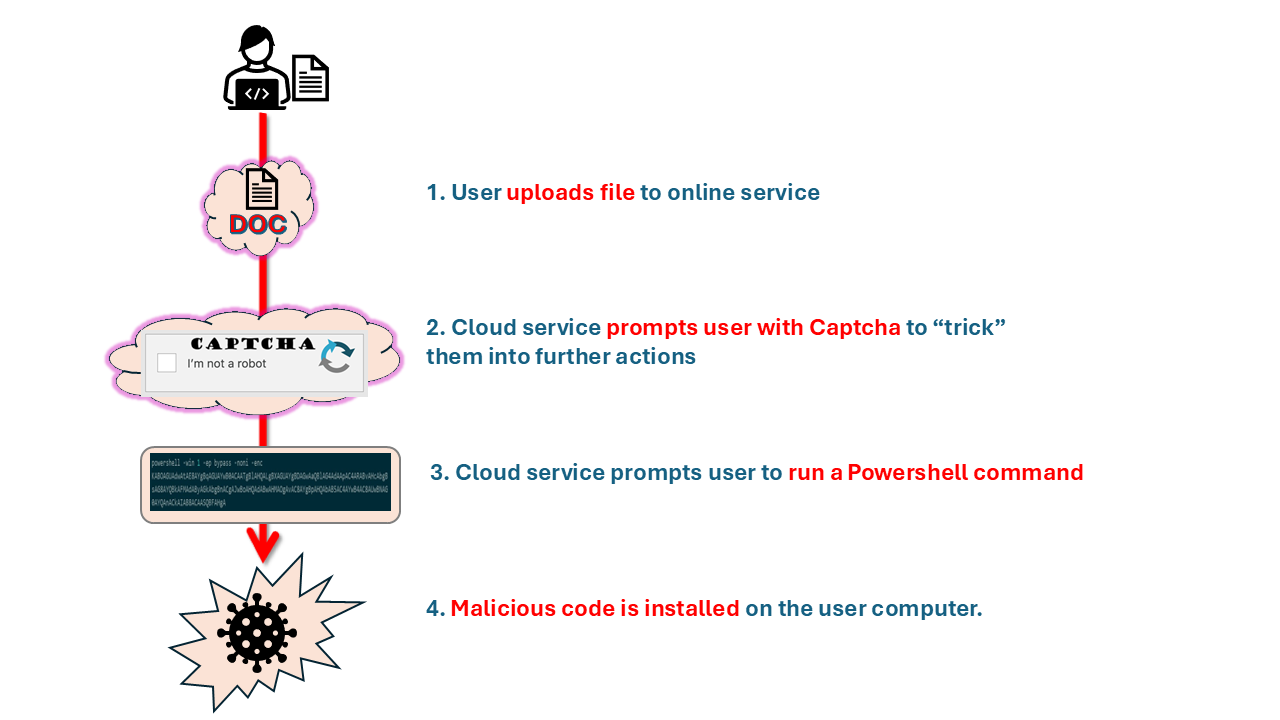
These fraudulent websites trick users into uploading files for conversion, only to execute malicious PowerShell commands that install malware. The malware steals sensitive data such as browser credentials and cryptocurrency wallet information. This highlights the risks of relying on unverified online tools for file conversion.

Here’s how it works: When users start the PDF conversion process on a malicious website, they encounter clever tricks designed to manipulate their actions. This could be fake loading animations or a CAPTCHA request. These imitate legitimate security steps, which make the sites seem trustworthy.

However, following the deceptive CAPTCHA interaction, the website prompts users to execute a PowerShell command that infects the user’s computer with malware.
Offline PDF tools, such as Win2PDF, offer a significant security advantage over online converters by processing documents locally. This ensures sensitive files remain on your computer, mitigating the risks of data theft and malware.

Win2PDF operates exclusively on your local system, guaranteeing that your files and data never leave your computer or network.

To ensure the security of your personal and professional data amidst ongoing cyber threats targeting online platforms, selecting offline PDF tools such as Win2PDF is a safer approach. Offline solutions enable efficient file conversion while preserving data protection.

Ultimately, choosing software to process your company’s sensitive documents requires trust. You can trust Win2PDF because:

Trust your documents to a secure solution. Download Win2PDF and see why we’ve been trusted for over 25 years. (Also, make sure that you only download only official setup programs from the Win2PDF website.)
The High Cost of “Free” Software

Adware.  Spyware.  Malware.  Bloatware. [Link goes to another good blog post on this subject].  These are all names for software that are secretly installed on your computer when you download so-called ‘free’ software programs.  Our recommendation?

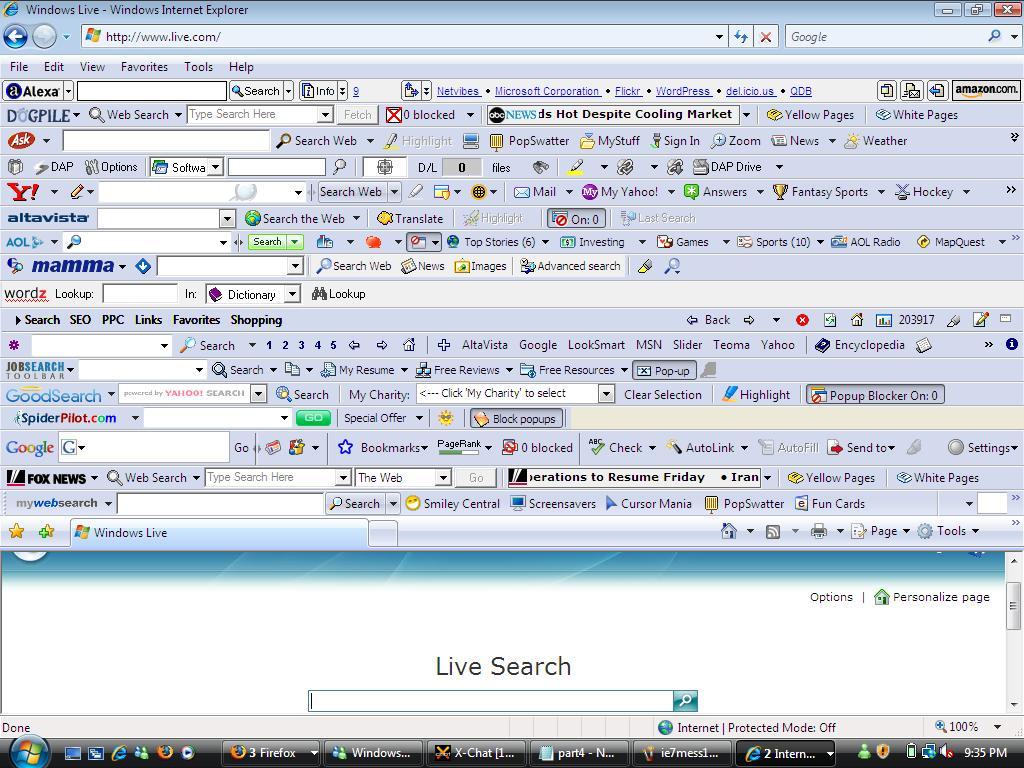
Be aware and beware!  Just look at this example of an Internet Explorer window riddled with toolbars that have been included with other software downloads.

Example of Internet Explorer overwhelmed with extra tool bars, often loaded by 'free' software
Example of Internet Explorer overwhelmed with extra tool bars, often loaded by ‘free’ software

It may look extreme, but if you’ve seen these types of toolbars or unwanted pop-up windows appear on your computer, it’s quite likely that they piggy-backed on some other ‘free’ software that you downloaded.

As a developer of commercial Windows software, we get offers and inquiries almost weekly from other companies who wish to include their software bundled into our installer.  While we always decline such arrangements (Win2PDF is 100% free of any adware/spyware), this is a typical model that many providers of ‘free’ software use to make money.  After all, it costs money to develop, support, and host software applications:  Web hosting, security, development and version control software, live chat and other technical support software all have costs.  As does having to maintain multiple computers with different operating systems and servers for testing.  And staff.  Let’s not forget about actually having real people in place to create, test, and support the software.  Even a lone programmer working in their own basement needs some revenue to create and make their software available.

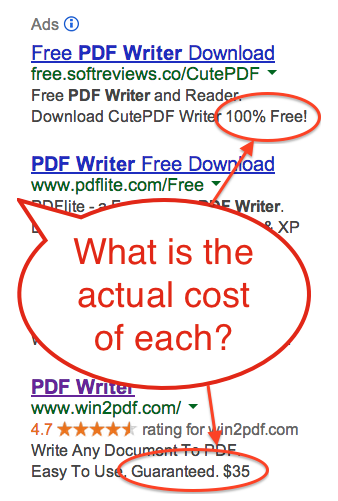
Google Search for 'PDF Writer'

If you perform a Google search of “PDF Writer” (see image to the right), the top result is for a “100% Free!” solution.

This is actually an Ad Supported download wrapper for the CutePDF software program, which is also Ad Supported.  If you follow the link to download, you’ll end up with at least 5 extra programs on your PC.  Do you know what these programs do?  Will they slow down your PC, or make it unstable?  Will it collect and transmit any personal information about you or your browsing history?  

If you don’t know, is it still worth it for the ‘free’ software?

Idealware.org posted a useful article on many of these same issues, along with questions to ask yourself when considering these free or low-cost software options.  For example,

    • If it’s truly ‘free’, how does the company afford to advertise it on Google or Bing?  Or pay to host the downloads?
    • Do the companies who make these downloads available even produce their own software, or are they just bundling other ‘free’ solutions?
    • Are you downloading directly from the publisher’s web site, or though a 3rd party site?  3rd parties often add downloaders that can add spyware.  Hint: It’s safer to download directly from the publisher!
    • Will it work in future versions of Windows, or with new service packs or updates?  Who do you contact if you have a problem or question?
    • How trustworthy is the publisher?
    • Do they offer independent reviews [Win2PDF example] on their products?
    • Do they list company information [Win2PDF example] on their web site?
    • Are they a member of the Better Business Bureau, and if so, what is their rating [Win2PDF example]?

Here’s a review of www.pdflite.com, one of the other companies that advertises on Google for the search word ‘PDF Writer’.  By contrast, here’s the review of www.win2pdf.com.  Can you guess which one is ‘free’?

Our company does not make ‘free’ software.  We charge for our products, and guarantee our products with a full 60-day return policy.  This allows us to say No to 3rd party spyware/adware publishers, and it provides the revenue we need to continue developing, supporting, and enhancing our products for the future.  We have a loyal customer base and we’ve been able to operate a successful business since 2000.

So, it’s up to you to decide what’s best for your needs.  Just know that there usually isn’t such a thing as ‘free’ software.  There’s usually a cost somewhere – just know what that cost is before installing it on your PC.

And always remember, be careful what you download.