
We’re pleased to announce the latest release of Win2PDF version 10.0.169.1 This free update brings a significant enhancement to our Batch Convert feature—parallel processing. Along with this update, we’ve included fixes for handling improperly formatted PDF files and addressed installation issues that were causing missing file errors.
Parallel Processing in Batch Convert
Most of today’s modern CPUs come with multiple cores, allowing them to perform several tasks simultaneously (provided that your software programs support them). This is where parallel processing shines—by dividing tasks into smaller chunks that can be executed concurrently, it dramatically speeds up processing times. With the release of Win2PDF 10.0.169.1, we’ve integrated parallel processing into Win2PDF’s Batch Convert feature, specifically for users who choose “individual files” as the output.
How Does It Work?
When converting a large batch of files, Win2PDF will now process multiple files simultaneously, utilizing the full power of your multi-core CPU. This means that instead of processing one file after another in a linear fashion (serial processing), Win2PDF can handle several files at once (parallel processing), significantly reducing the time needed to complete large conversion tasks.
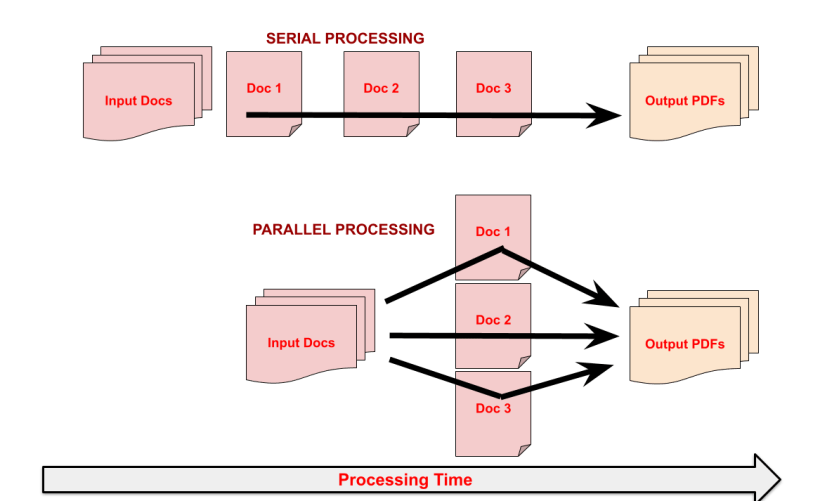
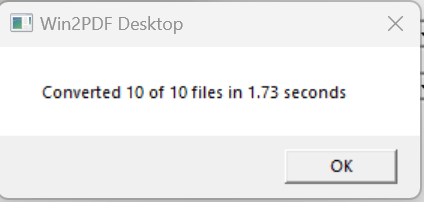
However, it’s important to note that this performance boost applies only when the output is set to “individual files.” If you choose to merge your files into a single PDF, the conversion must occur sequentially to ensure the correct order of pages. Despite this, you can still get a rough idea of the performance improvement by comparing the processing time for both individual and merged outputs. The new Batch Convert interface (shown below) now shows the time it took to complete the task, making it easier to gauge the impact of parallel processing.
Why Is This Important?
This enhancement is especially beneficial for customers who need to make large folders of scanned documents searchable using OCR (Optical Character Recognition). With the ability to process multiple files at once, the time it takes to convert and prepare documents for OCR is drastically reduced, allowing for a more efficient workflow.
It’s also important to note that this conversion process takes place entirely on your machine, using your hardware. Your files are never uploaded to the cloud or leave your computer.
Additional Fixes and Improvements
- Handling Improperly Formatted PDF Files: We’ve improved how Win2PDF handles improperly formatted PDF files, reducing errors and ensuring smoother conversion processes.
- Installation Fixes: This update also addresses issues related to missing files during installation, providing a more seamless setup experience.
Upgrade to Win2PDF 10.0.169.1 Today!
With the introduction of parallel processing, Win2PDF continues to evolve, offering enhanced performance and reliability for your PDF conversion tasks. Download the latest version today and experience the power of parallel processing.

 PDF Blog - Topics from the makers of Win2PDF