
The Win2PDF 11.0.10.1 update introduces expanded PDF/A archiving options, native Markdown support, improved spreadsheet formatting, metadata preservation for Word and Excel files, and email conversion enhancements. Most of these new features are only available in the Win2PDF Pro version of the software, but are available at no charge to all licensed users of Win2PDF or Win2PDF Pro 7.0 or higher.
1. Expanded PDF/A Archiving and Automation
[Note: This feature is only available in the Win2PDF Pro version of the software.]
Win2PDF 11.0.10.1 expands enhanced PDF/A support for both Win2PDF Desktop and automated workflows. Users can export documents directly to PDF/A within Win2PDF Desktop using File > Export > PDF/A.
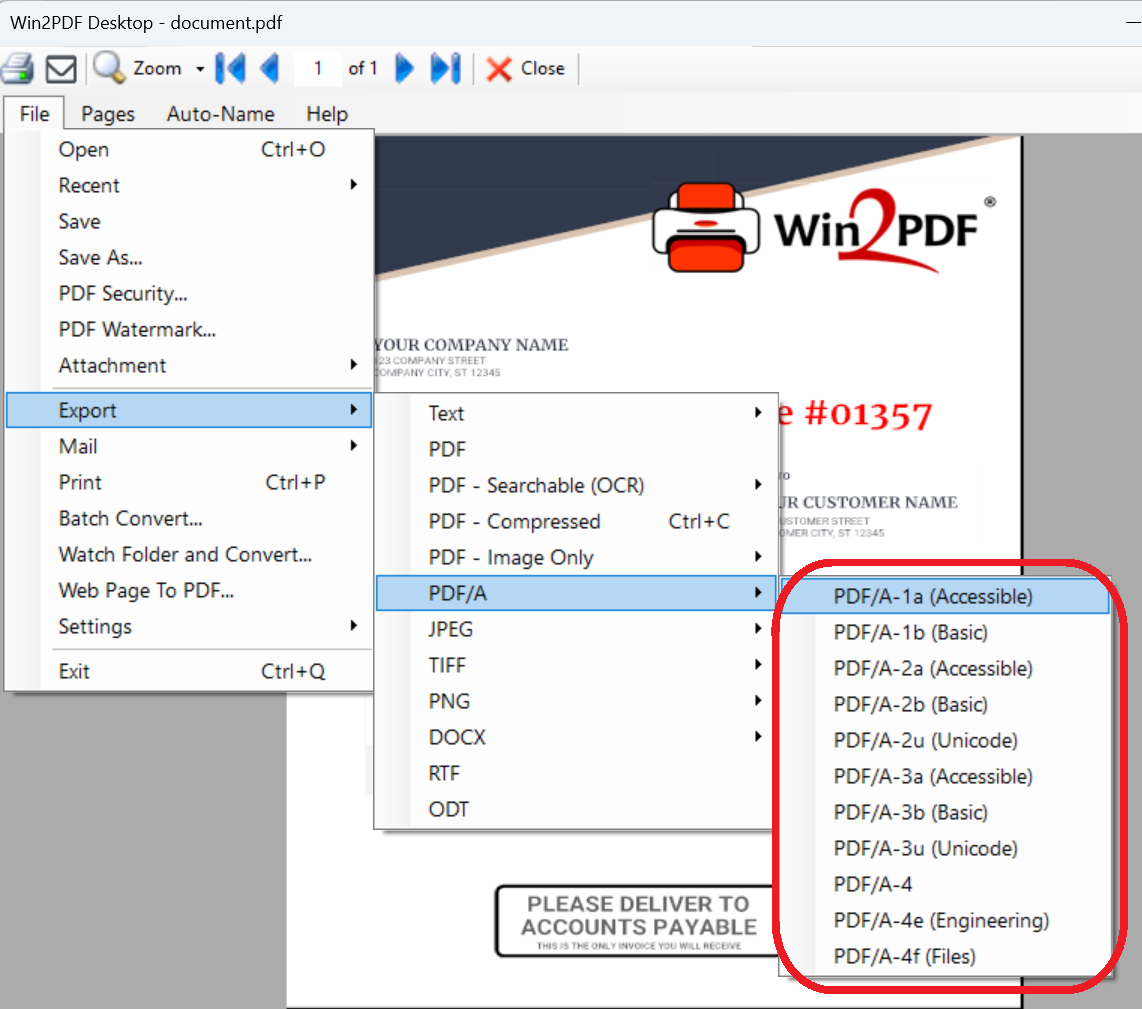
The 11.0.10.1 release supports additional PDF/A sub-types, which many customers have requested.
For automated processing, Win2PDF 11.0.10.1 includes support for:
- pdf2pdfa command‑line utility
- convertto formats covering PDF/A‑1a, PDF/A‑1b, PDF/A‑2a, PDF/A‑2b, PDF/A-2u, PDF/A‑3a, PDF/A‑3b, PDF/A-3u, PDF/A-4, PDF/A‑4e, and PDF/A‑4f
- Batch Convert and Watch Folder for automated PDF/A generation
These automated features assist organizations with high-volume compliance and long-term archiving needs.
2. Native Markdown Input and Output
[Note: This feature is only available in the Win2PDF Pro version of the software.]
Markdown is a lightweight markup language that you can use to add formatting elements to plain text documents. Win2PDF 11.0.10.1 introduces native Markdown support, allowing Markdown files to be converted to PDF or PDF/A or other formats, and other formats can be converted to Markdown.
New tools include:
- markdown2pdf command‑line utility
- convertto support for Markdown formats
- Batch Convert and Watch Folder automation for Markdown workflows
While Google Workspace offers native Markdown support in both Docs and Drive, it lacks batch conversion capabilities. Win2PDF fills this gap by supporting automated, batch Markdown conversions for various file formats.
3. Improved Spreadsheet-to-PDF Output
[Note: This feature is only available in the Win2PDF Pro version of the software.]
A new xlsxautofit output format is now available in convertto and Batch Convert. This option automatically adjusts column widths in XLSX source files to improve table readability in the generated PDF output.
4. Metadata Preservation and Email Processing Enhancements
[Note: This feature is only available in the Win2PDF Pro version of the software.]
Win2PDF 11.0.10.1 improves how document metadata is preserved during automated conversions. When using Batch Convert or Watch Folder, Win2PDF now transfers properties such as:
- Creation Date
- Modification Date
- Author
- Title
- Subject
- Keywords
from DOCX and XLSX source files to the resulting PDF. This helps maintain accurate document history and improves searchability in document management systems.
Email conversion handles multiple recipients and invalid address strings more effectively. Converted email PDFs also list attachment names in the document body.
Additional Resources
Full feature listing:
Win2PDF 11.0.10.1 download page:

